
NEICE Case Management System 2.0
Release Notes: December 2025 (Updated March 2026)
Version: 2.1.5
Below is the list of Issues that were reported to Tetrus that have been addressed in this Release version. These updates pertain only to the CMS and MCMS systems.
Case Management
•NEIC2-5037 – The system should no longer create tasks for closed cases. Tasks from closed cases should not appear in the Task Search.
•NEIC2-5038 – The system should allow users to update an existing violation with an end date.
•NEIC2-4878 – The system should allow duplicate case creation for children who had a 100B Closure in a previous case.
•NEIC2-4741 – The system should allow both Case Workers and ICPC Coordinators to edit and save the updated Custom fields for a child.
•NEIC2-1934 – The system should allow users to add an existing Care Giver/Household as a new Placement Resource.
•NEIC2-5029 – The system should display Sex and Gender fields in the “Children in Case” tab when switching between tabs.
• NEIC2-5243 – The system should enable the “Save” button on the Edit Placement Resource pop-up window when the “Update” button is clicked within the “Placement Resource Details” section of the Case Details screen.
•NEIC2-5237 - The system should successfully update and save Receiving County and Receiving Case Worker Agency for few received cases from Missouri.
Placement Decision
•NEIC2-3465 – The system should allow the 100B (Initial/Change/Closure) document to be generated after the previous 100B had been uploaded by the Caseworker/ICPC Coordinator.
Case Tasks
•NEIC2-5099 – The system should calculate the Final Decision Due Date as 180 days from the 100A sent date if the Case Acceptance Date by the Receiving state is not available.
•NEIC2-5204 - The system should export the Task Search results to a CSV file when the 'Export to CSV' option is selected, and the 'Worker Assigned to Case' filter is set to 'All' on the Task Search screen.
Dashboard
•NEIC2-5077 – The system should remove the case from the Overdue Incoming Compliance when an Additional Information transmittal is sent with the Preliminary Home Evaluation document enclosed or a Home Study Response is sent.
Communications
Messages:
•NEIC2-3937 – The system should no longer display the logged-in user in the Users dropdown when sending the message internally within the same agency.
•NEIC2-5062 – The system should allow users to attach multiple documents when sending a message.
Transmittals:
•NEIC2-4101 – The system should allow the users to submit the transmittal only after filling in all the required fields in the transmittal screen
Reports
•NEIC2-3531 – The system should display “All” as an option in the dropdowns across all the reports.
•NEIC2-5244 – The “Cases by Type of Care” report should now display the Child DOB in “mm/dd/yyyy” format.
User Profile
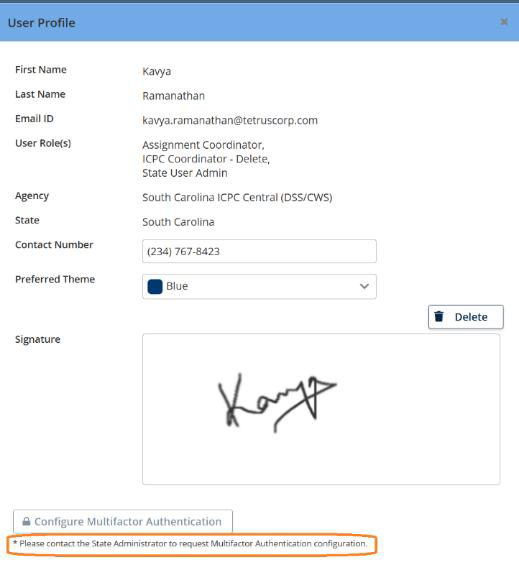
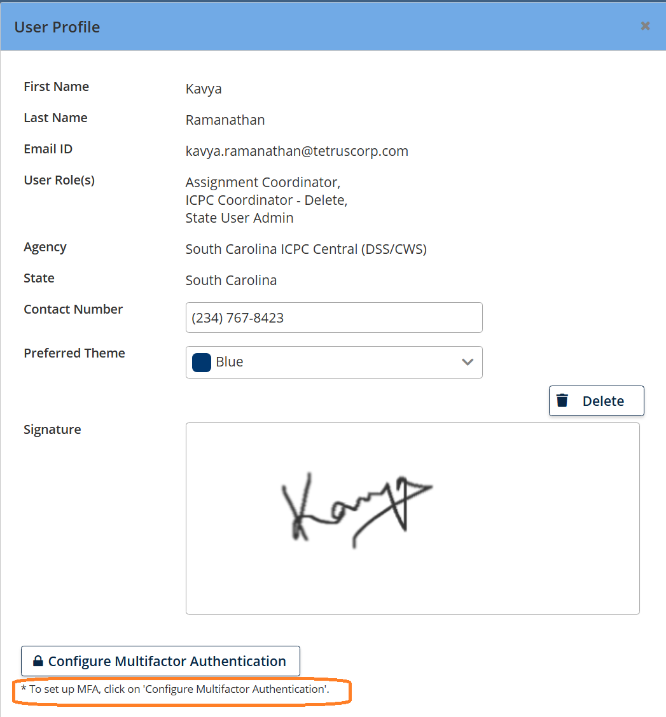
•NEIC2-4876 – The system should display the updated note for Multi Factor Authentication (MFA)
•When MFA is disabled: The note is displayed as “Please contact the State Administrator to request MFA configuration.”
•When MFA is enabled: The note is displayed as “To set up MFA, click on ‘Configure Multi-Factor Authentication’.
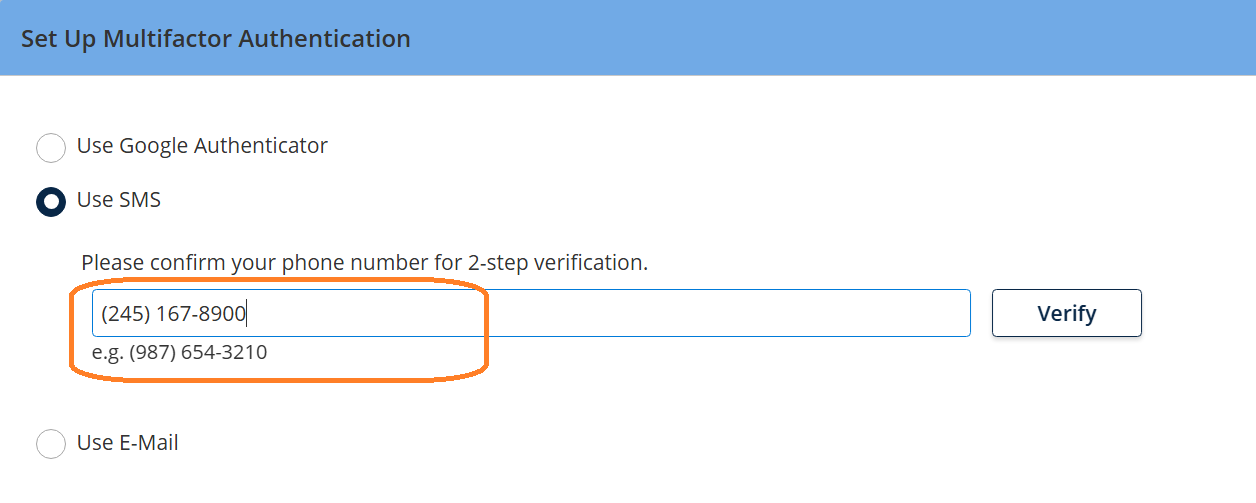
•NEIC2-4877 – The system should allow the users to enter the phone number in the standard format (000) 000-0000 without the country code.
XML Generation:
•NEIC2-4873 – The system should include Custodial Entity details from the 100B, regardless of whether a court order is attached.